
Trackmania Trainer
Rewind a mistake, save a flying respawn, and retry any section as many times as you need, even after restarting the game.

Whats new
v2.0.0
- Breaking change. Might need to rebind your bindings.
- 60-second rewind. Hold your rewind binding to go back. Release it to pause, hold it again to go farther, or press Replay Selected to resume driving from that exact point.
- Gradual speed changes. Rewind accelerates from 0.5x to 1.5x. Resuming starts immediate driving at 0.5x and goes back to normal speed in about 0.75s.
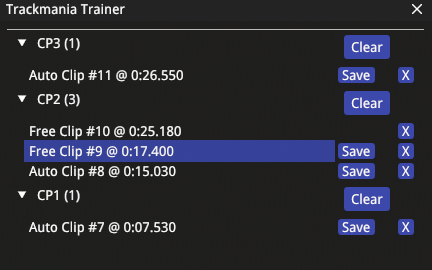
- Rename clips. Click the button with a pencil icon, type a name, and press Enter to save it.
- Camera restoration. Rewind restores the recorded camera state, with seamless transition back to driving.
- Replay state fixes. Improved timer restoration after restarting a race, vehicle changes during replay and rewind, and synchronization of moving items.
- Update notices. A yellow, clickable notice in the main window links here when the installed version differs from the latest release.
- Plugin compatibility. Trainer disables
Dips++on startup. It is not automatically re-enabled when Trainer stops. - Runtime stability. Fewer (I hope none) game crashes.
What it does
Rewind a mistake
Go back up to 60 seconds of driving. Pause at the point you want, then resume driving or save a clip there.
Save a spot
Press your save binding to create a flying respawn at the current moment, or let checkpoint auto-save do it for you.
Replay it
Pick a saved clip and replay it whenever you want another attempt. Use key binds to replay the current or previous clip.
Manage clips
Clips are grouped by checkpoint. Give them recognizable names, replay them, or save them to disk for another session or to share.
Keep the recorded state
Restore the race time, checkpoint progress, vehicle state, and camera. Ghosts and moving items stay synchronized with the restored timeline.
Change key binds
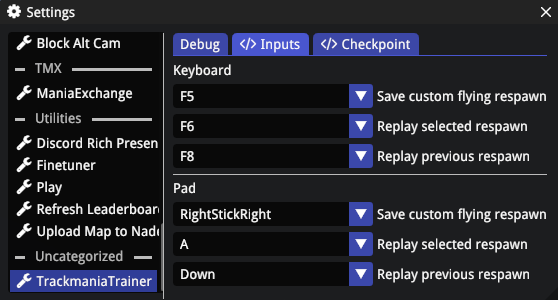
Keyboard and controller bindings are configurable. Checkpoint auto-save is on by default.
Install & Setup
-
01
Install Openplanet for Trackmania 2020.
-
02
Install the
BlockableInputCallbacksdependency through Openplanet's plugin manager.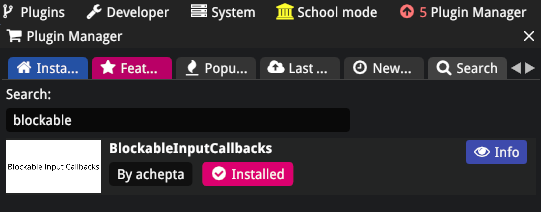
-
03
Download TrackmaniaTrainer.op and put it in
%USERPROFILE%\OpenplanetNext\Plugins. -
04
(Re)Start Trackmania, or reload plugins if the game is already running and select
Signature Mode -> Developer: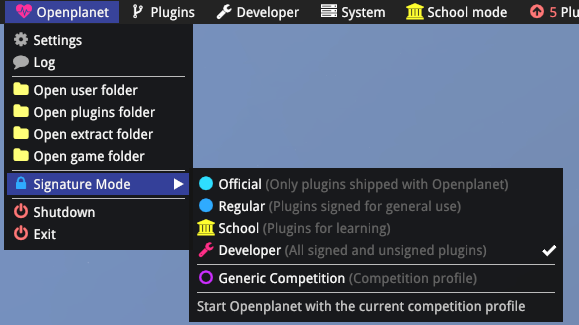
-
05
Bind the keys for available actions:
-
06
This step is optional. If experiencing issues with alt cameras during clip replay,
use plugin Block Alt Cams by XertroV ↗
Features
-
01
Create a custom respawn at any point in the race.
-
02
Create an automatic respawn when crossing a checkpoint.
-
03
Keep all created respawn clips grouped in checkpoint buckets.
-
04
Select and replay any of the created clips.
-
05
Save a clip on disc. They are stored in
%USERPROFILE%\OpenplanetNext\PluginStorage\TrackmaniaTrainer\SavedSessions
grouped by Map UID in custom*.Copium.Clipformat -
06
Create a Mediatracker clip from a saved clip using https://tmrpg.com/copium-clip/
-
07
Saved clips could be replayed after the game restarts and/or shared with other players.
-
08
Race time is restored when replaying a clip.
-
09
Camera is restored when replaying a clip.
-
10
Ghosts are synced when replaying a clip.
-
11
Finish is disabled.
-
12
Rewind up to 60 seconds.
-
13
Rename clips.
-
14
Moving items are synced during clip replay and rewind.